
Introduction
With the arrival of S/4HANA, SAP has introduced a change, with regard to the development of business layers from ERP tables. The aim is to be as close as possible to the database in order to get the best performance.
The introduction of CDS (Core Data Services) Views is an improvement on the ABAP (Data Dictionary) layer. They provide a more advanced and semantically rich data model.
Thanks to CDS Views one can expose, model, link, aggregate, … the data present in the database, and thus make it more easily accessible.
Getting started with CDS Views
Technically, CDS is a collection of SAP-specific languages. It is an extension of SQL and at the same time a data definition language (DDL), a data manipulation language (DML) and an authorization control language (DCL). With this, we can create a virtual data model called VDM (Virtual Data Model).
There are three types of views :
- Basic : these are used to bring data directly from the physical tables in the database.
- Composite : this type of view is used to link basic views together through associations (like SQL joins between views). They are then used by the consumption views.
- Consumption : these views allow you to create a specific query from a “composite” view. This is the only type of view that can be exposed to the OData or transient service to be consumed for reporting.
The features added in the extended SQL of CDS are :
- SQL features : calculations, aggregations, UNION, joins and GROUP BY.
- Associations : to link several tables and/or views.
- Annotations : allow to define meta-models such as naming, ABAP permissions, view extensibility.
- Extensibility : a view can be extended by a client application without modifying it, which makes it reusable and flexible.
- ABAP security : CDS uses ABAP authorization objects and transport layers. In addition, security can be defined explicitly with annotations.
In all cases, their development goes through Eclipse, through a plugin. This tool is called ADT (ABAP Development Tools).
Subscribe to the Rapid Views Newsletter !
Stay up to date with our latest blog posts, upcoming webinars and news!
ABAP Development Tool (ADT)
It is a development tool based on Eclipse, which allows you to use the power and flexibility of this tool. It has the following features :
- You can connect to multiple ABAP systems simultaneously.
- You can recover the session when you log out. This reduces their impact.
- Can be developed on both ABAP and non-ABAP platforms.
The ADT looks like this :
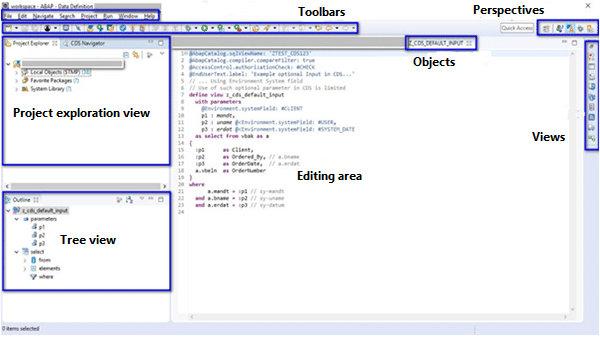
- Project Exploration View : This view allows the user to explore the various ABAP packages and objects from an ABAP connection
- Tree view : this view displays the structure of the object opened in the editing space. It displays the parameters, projections, joins, etc. in a hierarchical manner.
- Editing space : window where the view is expanded
- Perspectives : a configuration of views and editing spaces. Changing the perspective changes the layout of these views and editing spaces.
- Objects : open objects in the editing space.
- Toolbars
- Views : screens displaying the functionality of the tool.
Below are the steps to create an ABAP project in Eclipse :
- Menu Window -> Perspective -> Open Perspective -> Other, change the perspective to ABAP Perspective.
- Create a new ABAP Project in File -> New -> ABAP Project.
- Choose the system on which you want to develop and enter the login and password.

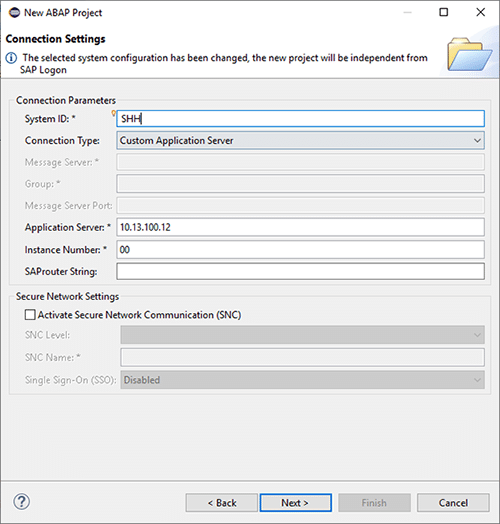
Once connected, we can create our first “View”.
- To create a view, right-click in the tree, then New -> New Data Definition.
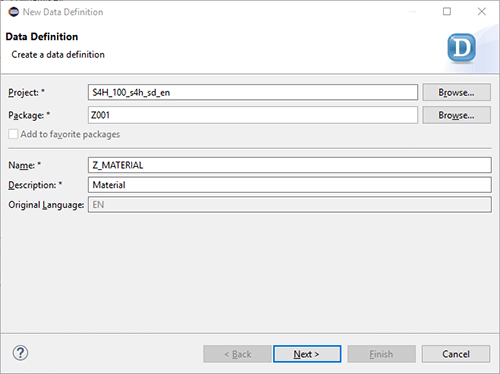
- Choose the transport. The transport in SAP is the tool for transferring objects from one environment to another.
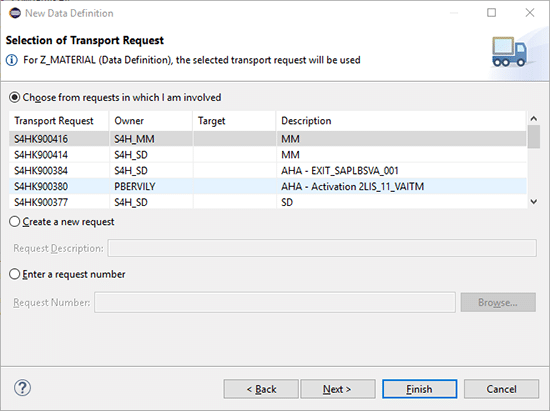
- Choose the view template you wish to create.
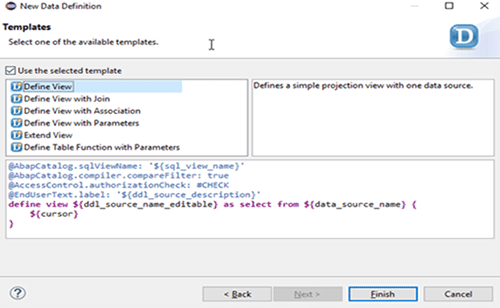
- Votre vue est créée.
Analysis of the DDL of a view
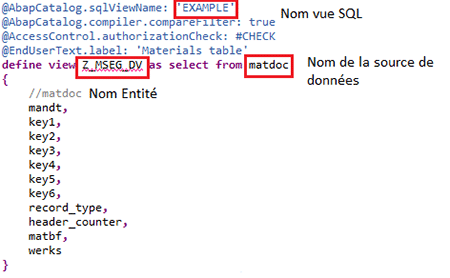
CDS Views are defined in a source DDL and at activation time it generates two objects :
- SQL View : this is an invisible object in the ABAP dictionary that cannot be modified.
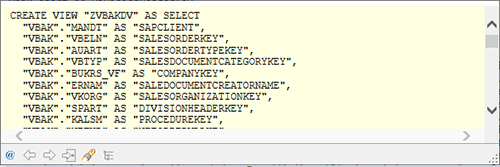
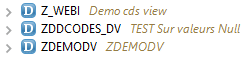
- CDS View
The simplest form of CDS View is the projection, i.e. a selection of fields from a single table. The name of a view specified in @ABAPCatalog.sqlViewName must be different from the name of the CDS entity and their names cannot exceed sixteen characters.
DDL features
As presented earlier, CDS views have extensive SQL functionality (calculations, GROUP BY…) but also the possibility to add associations, annotations and extensibility.
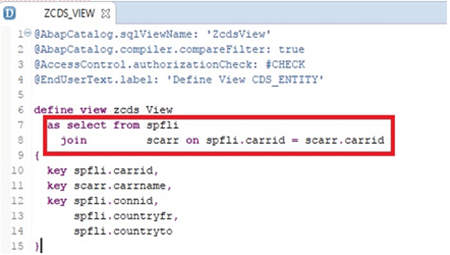
Views with a join
Views with aggregations
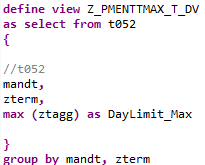
The views with aggregations include the traditional functions such as MIN, MAX, SUM, AVG, COUNT and COUNT (DISTINCT). They can be used in the selection list or the HAVING.
Views with unions
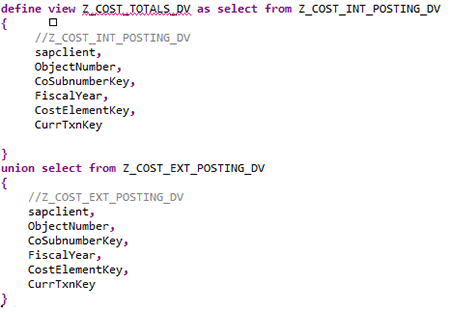
The two result sets of a DDL are merged. Any duplicate rows between the two tables are removed from the final result.
Views with associations
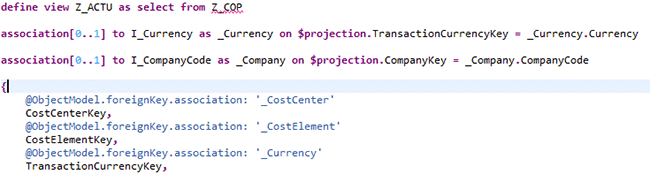
Associations are used to link the different views. They give semantic information about the relationships between tables, such as cardinalities. They have a particular syntax but the SQL generated is in the form of classic joins.
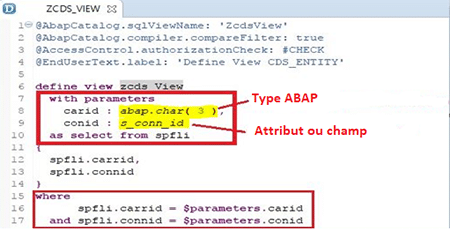
Views with parameters
Sometimes users need to enter parameters to influence the results according to business needs. This is the case, for example, if the user wants to filter the results on a language, or if they want to modify the results of a calculation by entering the percentage of a discount coupon. They are defined through the WITH PARAMETERS clause. When the view is executed, the user will be asked for these parameters.
Expert's conclusion
CDS Views add a semantic layer to SAP data that makes it more meaningful to business users. From this, users will be able to build operational datasets and create dashboards with real time data directly from the ERP with third party tools.
In addition, the features provided in CDS Views allow the construction of complex views involving several tables or other views. It is therefore possible to create semantically rich views that are as faithful as possible to business requirements and encapsulate all business rules.
Thanks to their integration in the ABAP layer, very useful functionalities such as security recovery allow to build a reliable and secure model.
However, building these views requires CDS development skills. SAP opted for the flexibility and ease of use of Eclipse to make the development of these views as smooth as possible.
Thanks to Steven VERBRAEKEN for his help in writing this article