
Introduction
The RapidViews solutions aim to offer a real accelerator for the deployment of your SAP HANA BI projects, but also to manage and maintain them. RapidViews are composed of virtual datamarts or data counters, predefined reports and fact/dimension tables (HANA Views), which are the foundation of the solution. They are available on the SAP FI-CO, SD, MM and PP ERP modules.
We estimate that the RapidViews solution covers on average 70% of the customer’s BI needs once installed. To cover the remaining 30% of needs and thus satisfy all the additional requests of the customers, we propose to accompany them in the realization of the developments.
To do this, we use a method that is broken down into several stages:
- In the first instance we work directly with the client to understand their needs. This step leads to the generation of technical specifications using a tool included in RapidViews.
- At the same time, using the same tool, we determine which requests are already covered by RapidViews and which ones will need to be added to the model.
- Finally, once the developments in HANA Studio and the reporting are completed, we proceed with the acceptance of the data.
Use Case :
Creation of a RapidViews view for the financial analysis of open items in the accounts receivable/payable balance :
To illustrate how we work, we are going to present the work carried out for one of our clients as part of a BI deployment on general accounting (FI-CO module).
Customer need
Our client wishes to reproduce in its reporting tools the flow of offsetting of accounts receivable which concerns open accounting documents (recorded or prerecorded). In our case, customers offset supplier/customer items in the payments issued by providing account statements tracking these offsets.
Presentation of the FI-CO RapidViews used :
Let’s start by presenting the RapidViews used from the FICO module.
We have used the following two views of the RapidViews :
- The Customer Balance view (F_CUSTOMERS_ITEMS_DV)
- The Supplier Balance view (F_SUPPLIER_ITEMS_DV)
Subscribe to the Rapid Views Newsletter !
Stay up to date with our latest blog posts, upcoming webinars and news!
Summary of specifications
The RapidViews have as standard the views we need to meet the requirement “Global analysis of open items”. Indeed, the supplier and customer balance views have been installed at the customer’s premises on a turnkey basis.
However, we note that these views are independent, and the interest of a “Global analysis of open items” view is to bring together the data from the two views mentioned above in a single view, and to complete the missing elements from SAP tables, indicator calculations and business rules specific to our client.
The objective of this specific development is therefore to create a “Global analysis of open items” view that we will call F_PARKED_ITEMS_DV. This view will link the customer balance, the supplier balance and the parked accounting documents, and will also include the business rules specific to our customer.
The F_PARKED_ITEMS_DV view will be part of the layer of views above the RapidViews :
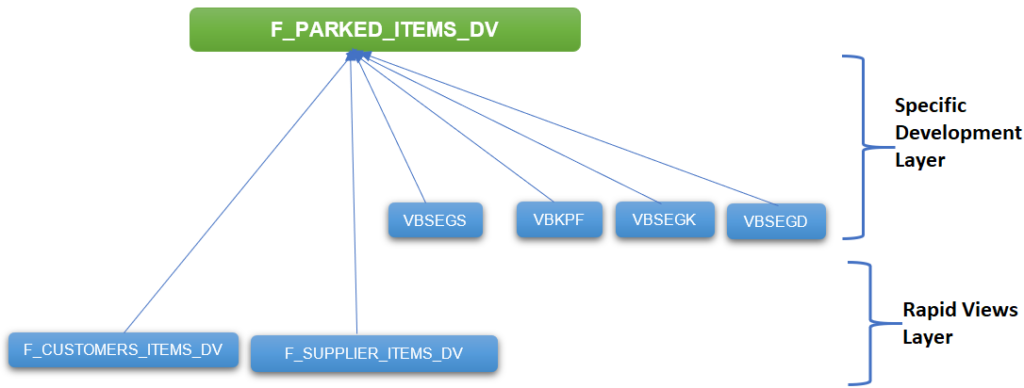
The solution implemented consists of determining the accounts in compensation of customers/suppliers linked to a recorded or parked accounting document using the F_CUSTOMERS_ITEMS_DV and F_SUPPLIER_ITEMS_DV views.
The technical solution is as follows :
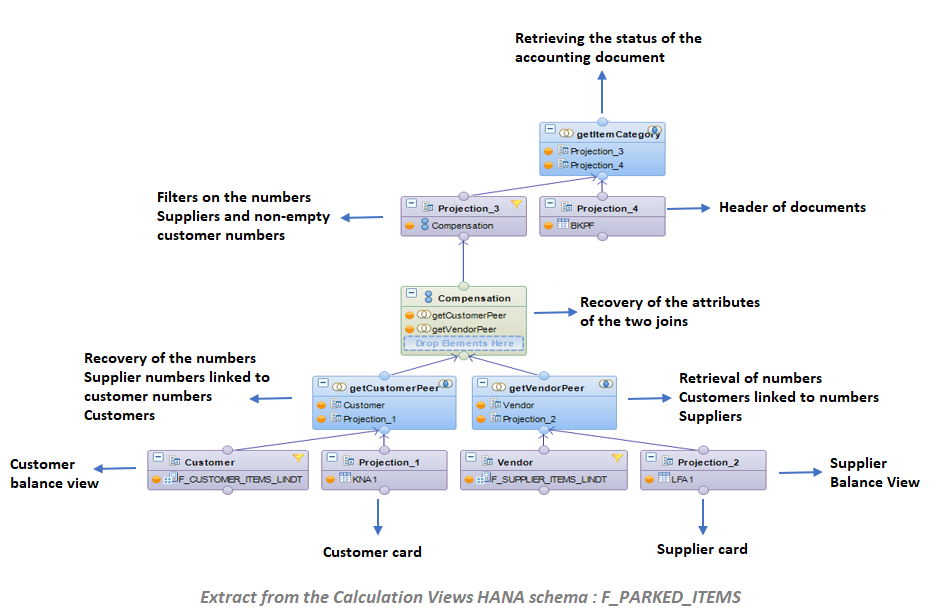
- The two joins “getCustomerPeer” and “getVendorPeer” retrieve the recorded accounting documents linked to accounts in compensation
- The first join is performed between the F_CUSTOMERS_ITEMS_DV view and the KNA1 table (Customer file) on the “Principal” and “Customer number” fields in order to retrieve the supplier accounts linked to customer accounts.
- The second join is possible between the F_SUPPLIER_ITEMS_DV view and the LFA1 table (Supplier File) on the “Principal” and “Supplier No.” fields in order to retrieve customer accounts linked to supplier accounts.
- The “Offset” union retrieves the attributes of the customer/supplier accounts in offset from these two joins.
- The filter in “Projection_3” makes it possible to keep only customer accounts linked to supplier accounts.
- The “getItemCategory” join between “the projection_3” and BKPF (Header of the accounting document) allows us to retrieve the status of the accounting document (Registered/Pre-Posted)
- The retrieval of parked accounting documents linked to offsetting customer/vendor accounts is done in the “Join_2” join as shown in the diagram below :
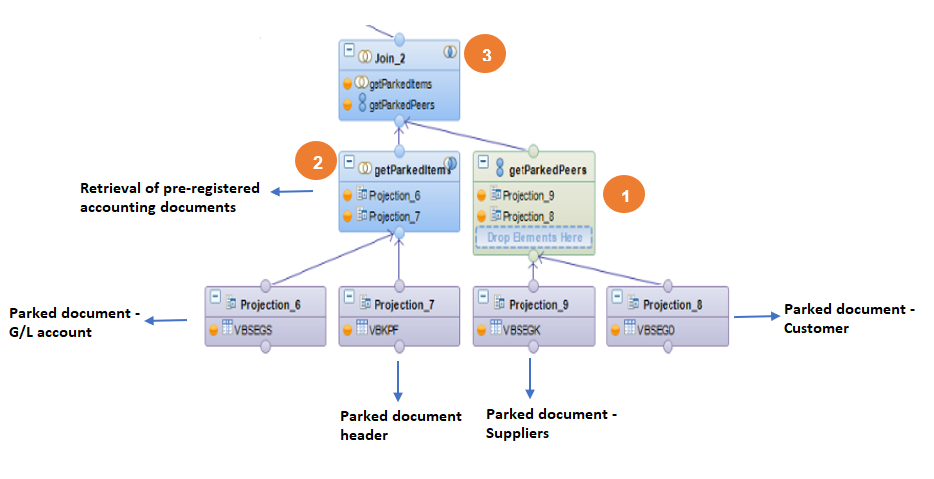
- Union between parked documents linked to suppliers and parked documents linked to customers “getParkedPeers”.
- Joint between headers and items of the “getParkedItems” parked documents.
- A join between “getParkedPeers” and “getParkedItems” in order to retrieve all parked items linked to customer accounts and/or supplier accounts.
Below is the final version of the F_PARKED_ITEMS view:
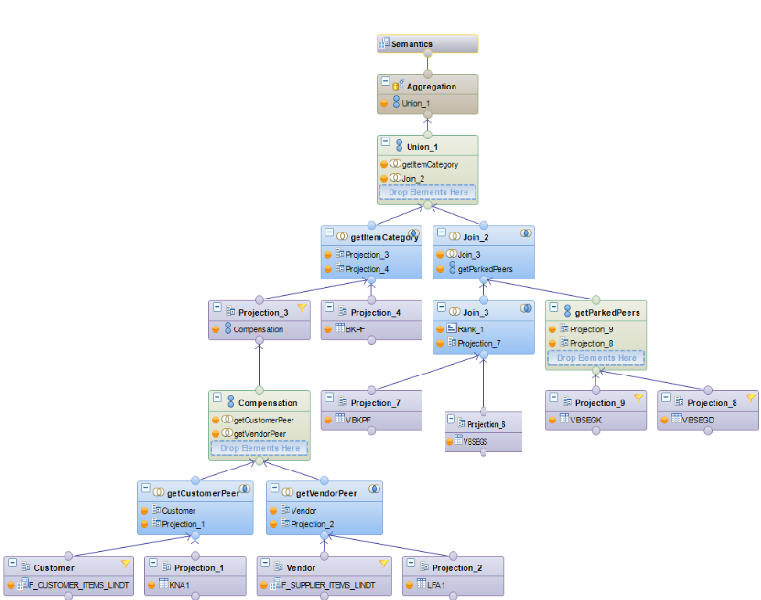
We find the following elements:
- A union between the posted accounting documents of offsetting customer/supplier accounts with the parked accounting documents related to offsetting customer/supplier accounts.
- The calculated column “IndicatorIsParked”: Flags preregistered items to P and standard items to S.

Once the new factual view is complete, it can be used in a datamart with all the dimensions required for the desired analysis.
Conclusion
The “General Open Account Analysis” view is a view created to meet a specific need for accounting for offsetting customer accounts. It allows to identify open accounting documents (posted or parked) related to cleared accounts.
In this practical case, we added SAP tables not present in the Standard RapidViews, created additional calculated fields and made joins / unions between several RapidViews.
The additional developments can vary according to the needs of the customers :
- Add specific SAP tables or fields (e.g. Z_ tables…)
- Implementing customer-specific business rules
- Create new indicator calculations
- Adding external data
- …
This case study shows how RapidViews can be used and adapted to meet a need for SAP data analysis in the HANA world.
RapidViews with our foundation and our tools and methodologies allowed us to respond very quickly to our customer’s request.